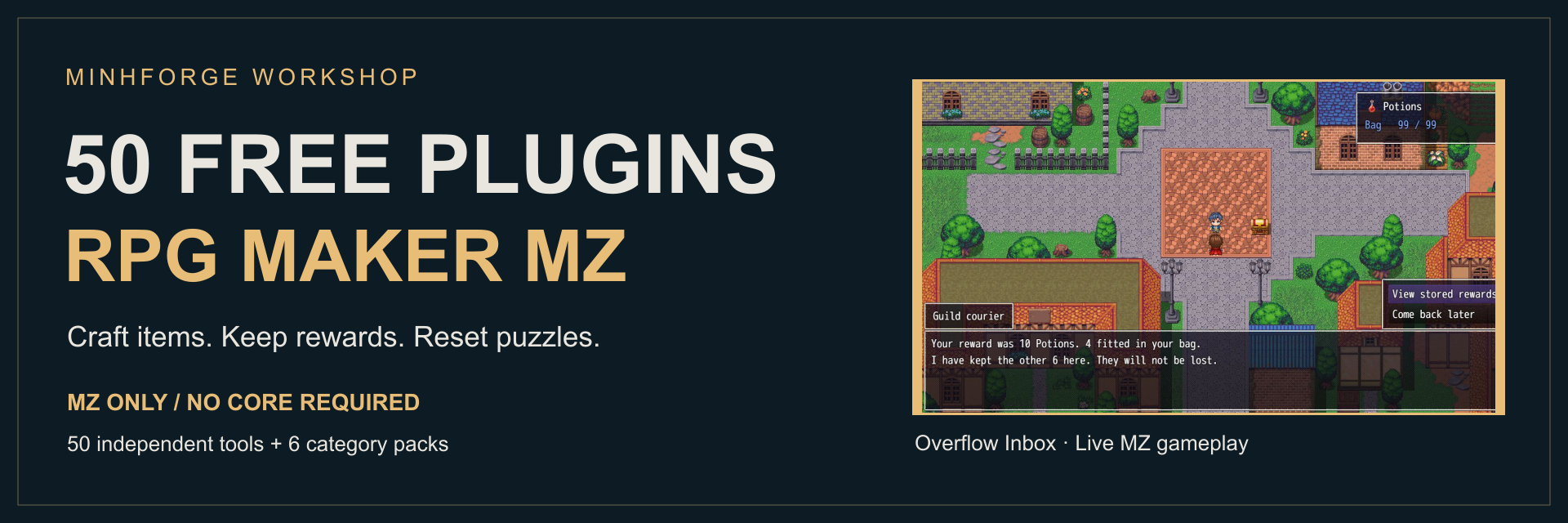
50 Free RPG Maker MZ Plugins — Craft, Protect Rewards & Fix Events
A downloadable plugin
Make your next MZ event easier to build.
Craft a batch, keep a full bag from losing rewards, recall an equipment set or reset a puzzle. Choose from 50 free, independent RPG Maker MZ plugins and keep building your game.
MZ ONLY · No required core · MIT · Free for commercial games
Tested with MZ 1.1.1 and 1.9.0. Release v1.0.2.
Choose your plugins — download free →
50 individual downloads or 6 optional category packs. At the donation prompt, choose “No thanks, just take me to the downloads”.
See the tools inside a real MZ game
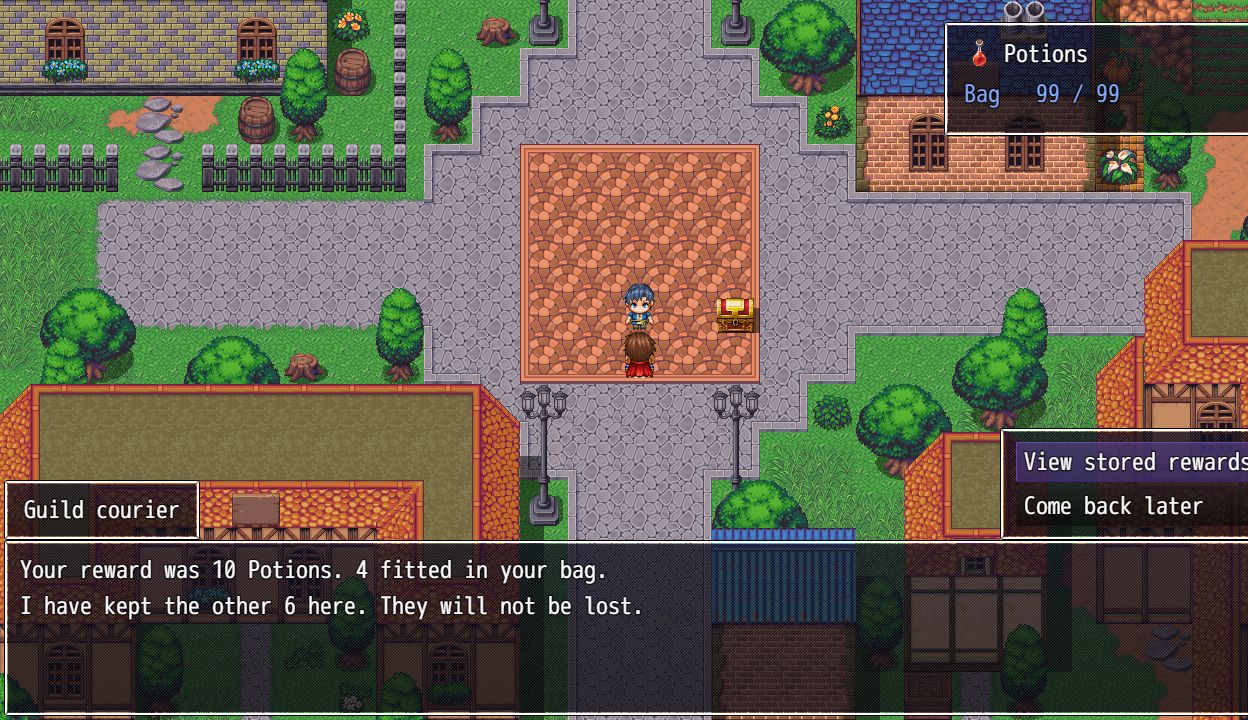
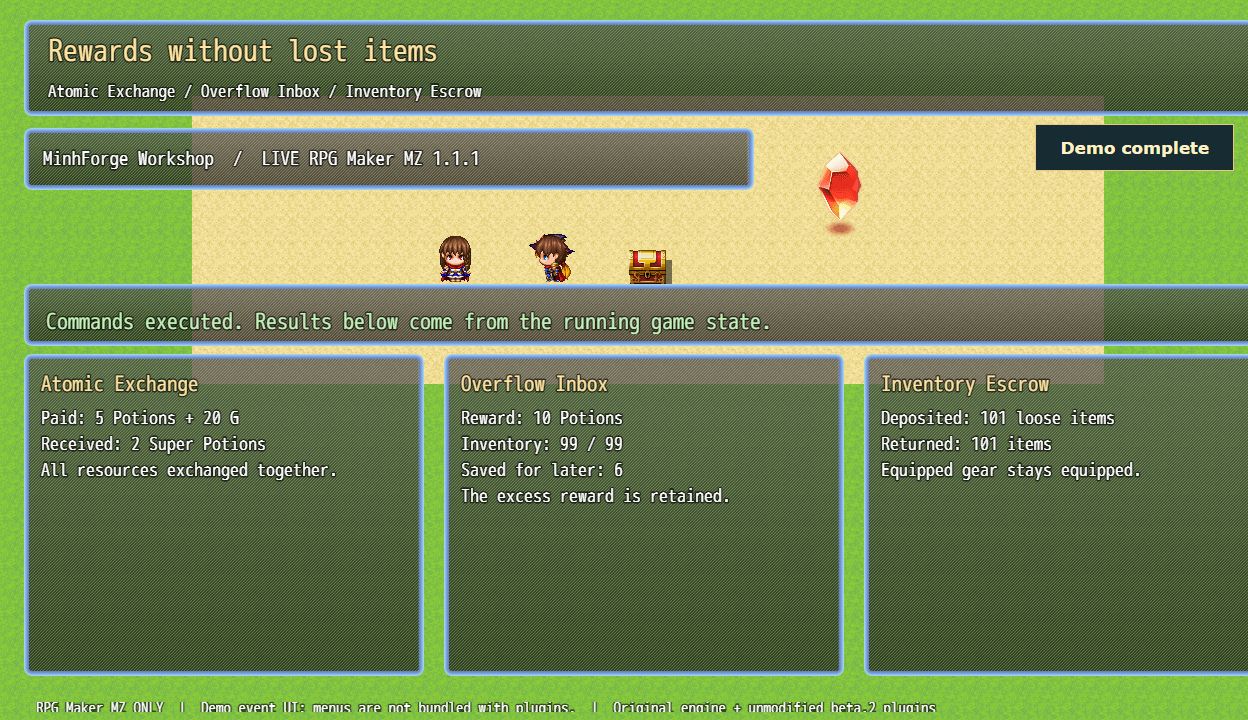
Overflow Inbox — an event reward fills the bag to 99. The remaining six Potions stay with the courier, ready to claim later.
Direct captures from RPG Maker MZ 1.9.0 running the released plugins. Event layouts and added menu choices are working demonstration UI; these menus and sample-game assets are not included in downloads.
See crafting, equipment, puzzle and journal examples
Recipe Book — brew supplies at an event counter
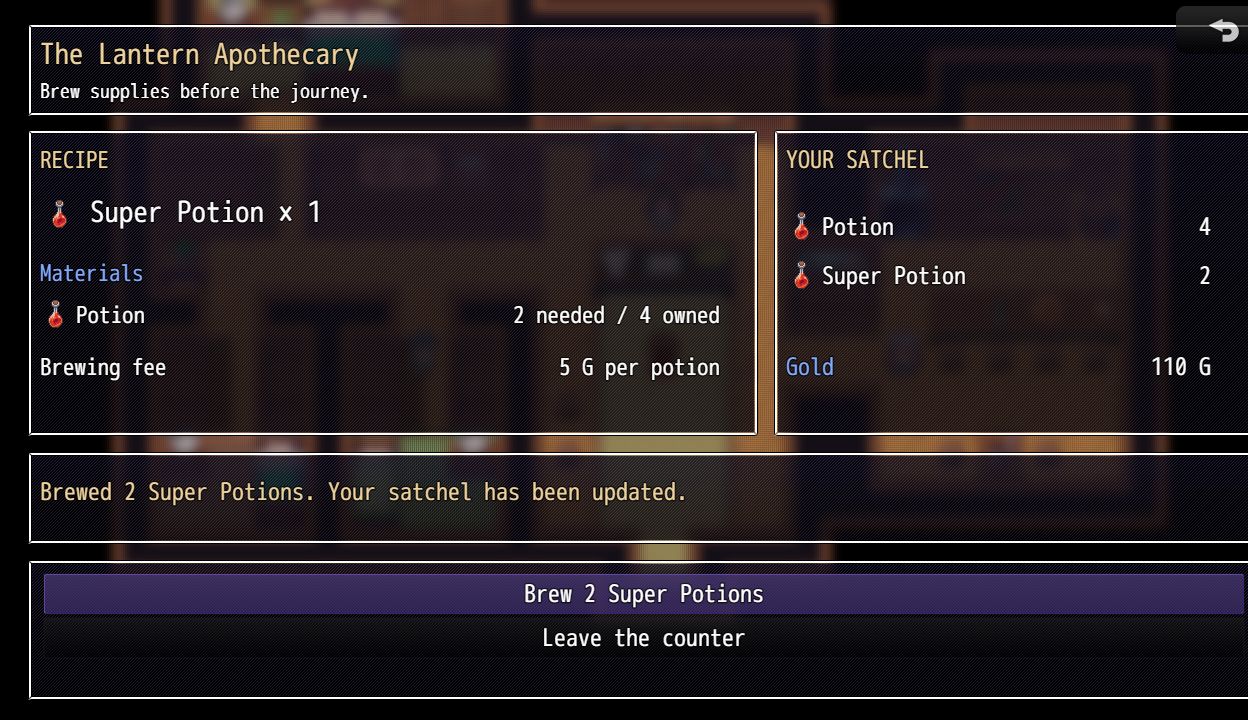
The player selected Brew 2: four Potions and 10 G were spent, and two Super Potions arrived in the satchel. The UI reads the actual inventory after the plugin command.
Equipment Loadouts — recall a saved field kit
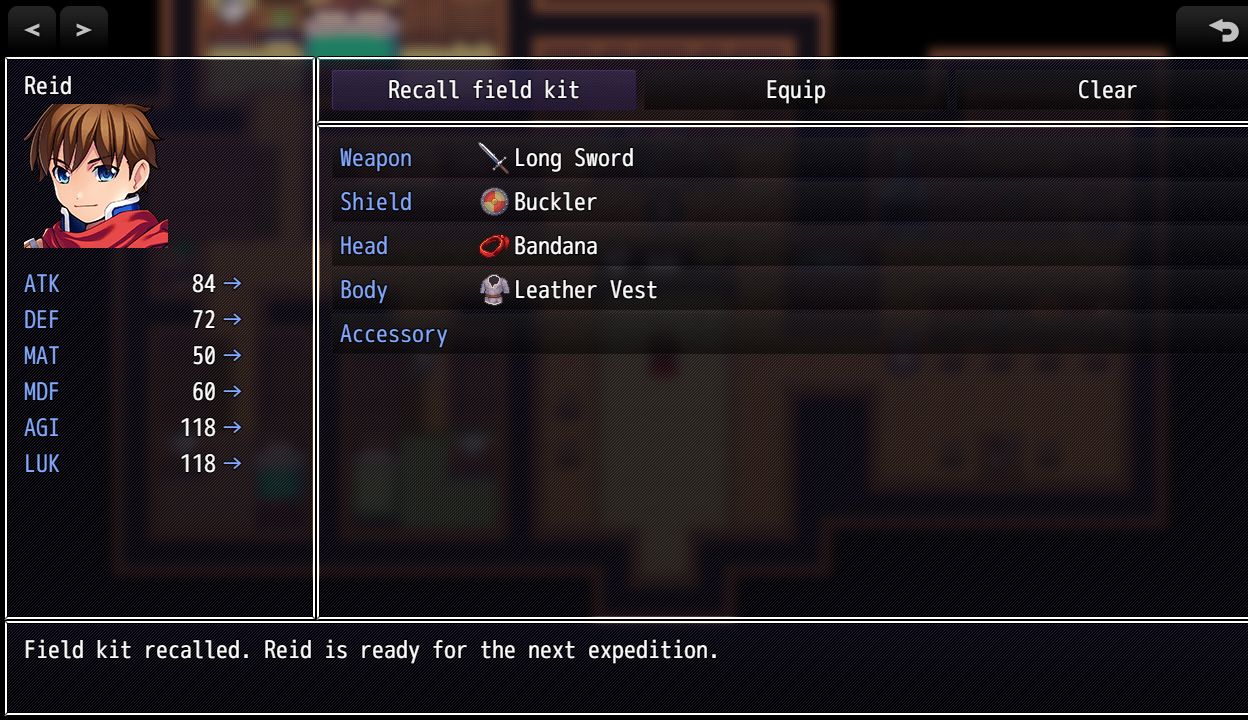
The Recall field kit choice calls Equipment Loadouts. The native MZ equipment menu shows the returned sword, shield, headgear, armor and resulting stats.
Event Position Slots — restart a puzzle room
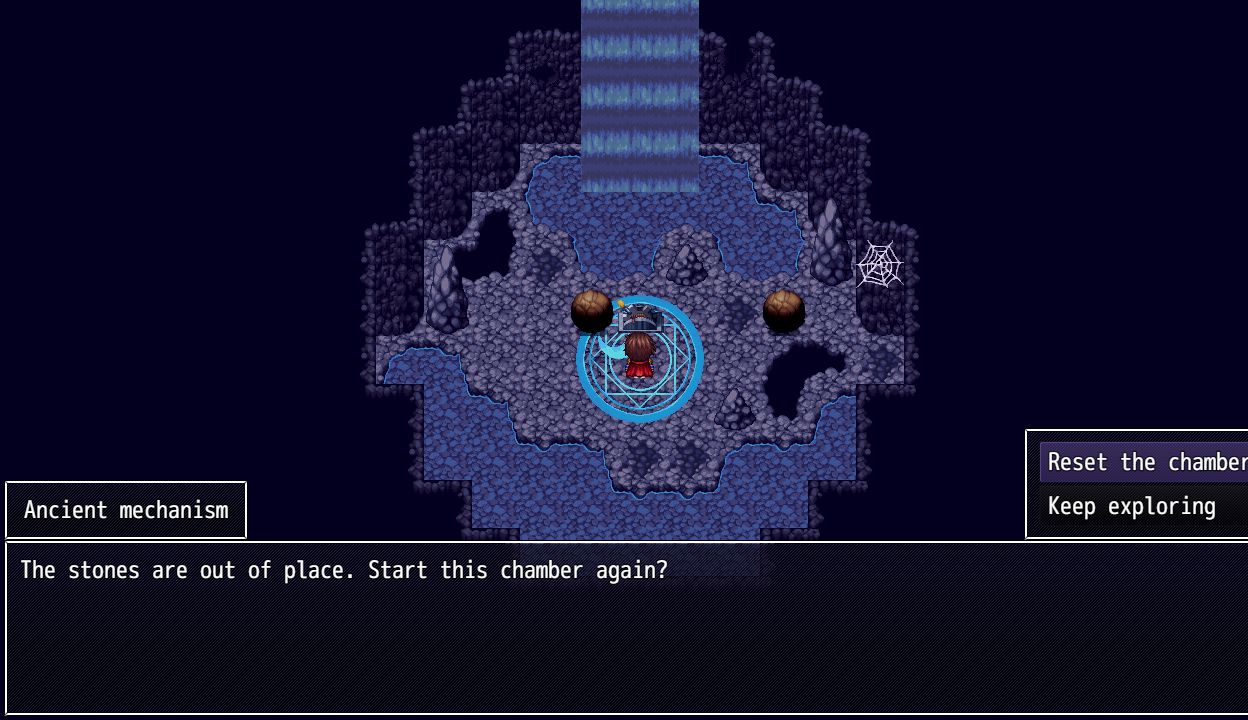
Before: the stones have been moved. The player interacts with the chamber mechanism and chooses a reset.
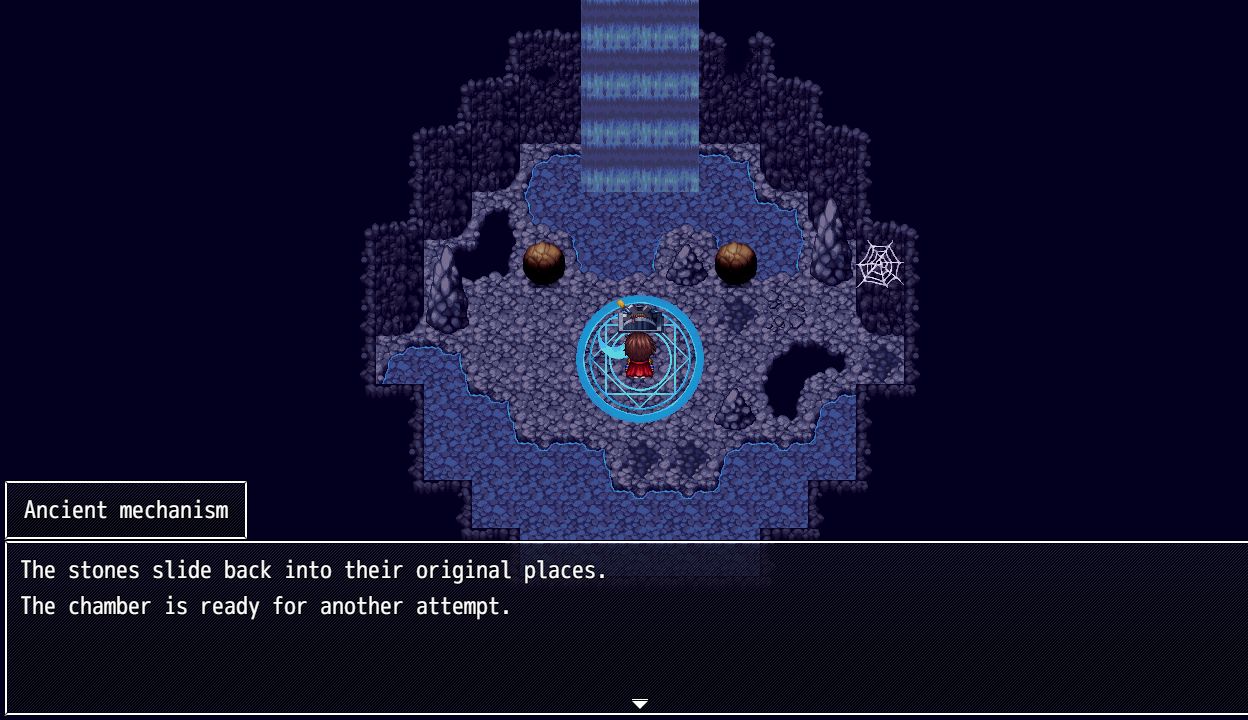
After: Event Position Slots returns the two stone events to their saved tiles. Variable Checkpoint separately restores the selected puzzle flag and counter; the player stays in the same room.
Objective Counters and Collection Album — drive your own journal
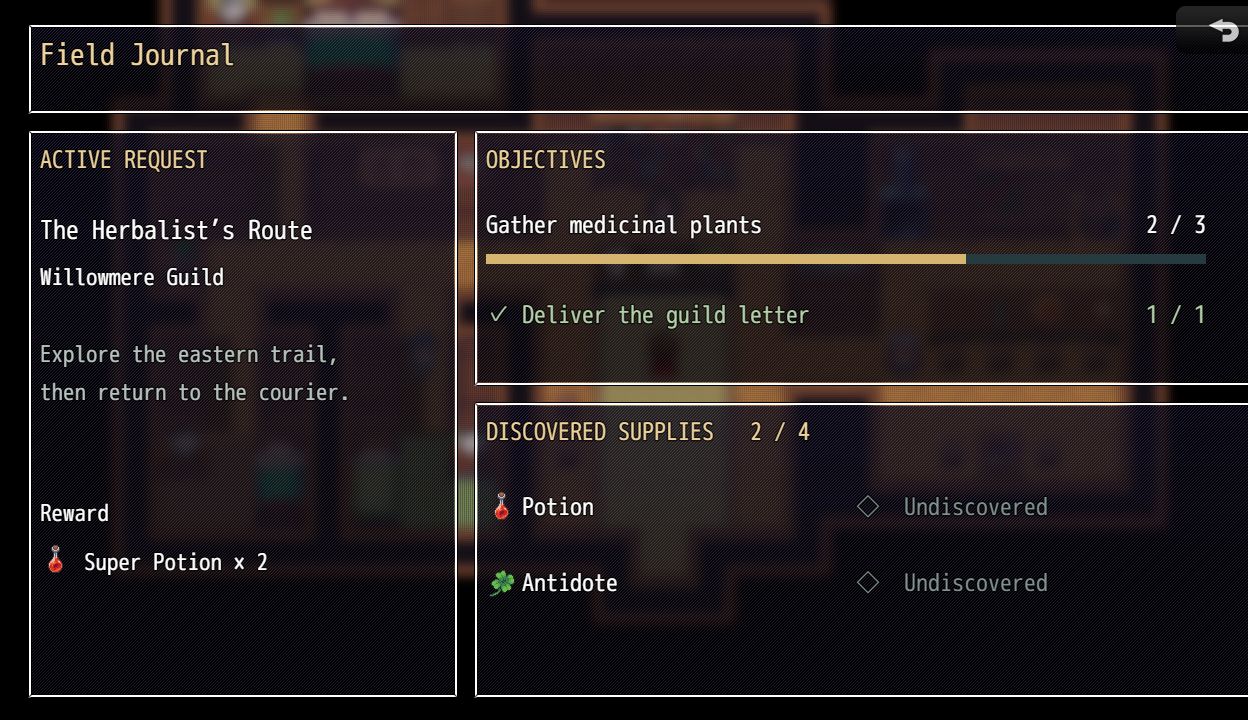
Objective Counters supplies the objective values and completion state. Collection Album supplies the saved discovery counts. The journal is a demonstration interface built from those running game values.
Choose your category
Open a category below. Every plugin has its own feature description, setup example and limits. Category packs contain the same standalone files.
Inventory & Economy
8 independent plugins. Available individually or in this category’s optional pack.
Browse Inventory & Economy — 8 plugins
Resource Exchanges
1. Atomic Exchange
MZ only · MZ 1.1.1 & 1.9.0 · Independent plugin
Check a multi-item trade and its final inventory capacity before spending the player’s resources.
- Trade several items, weapons, armors and gold in one command. Duplicate lines are added together, and equipped gear never pays a cost.
- Check is a preview; Trade rechecks all costs and final stack limits immediately. A reward cannot fund its own input cost.
- Synchronous exceptions or rejected stock count changes restore the affected stock quantities and gold.
Event setup & compatibility limits
Example: Give the party 5 of Item 1 and 20 gold.
Limits: Supports the standard count-based inventory. Independent-item, grid, global weight and custom currency systems need an adapter. Stock count rollback cannot undo arbitrary third-party callbacks, achievements or external side effects.
Separate download: MF_AtomicExchange-v1.0.2.zip
Reward Delivery
2. Overflow Inbox
MZ only · MZ 1.1.1 & 1.9.0 · Independent plugin
Keep the part of an event reward that does not fit, and let the player claim it later without duplicating that reward.
- Grant fills available stack space and stores the excess per item type in the current save.
- A permanent RewardKey receipt makes repeated calls for the same chest or quest harmless: the repeat is rejected.
- Claim transfers only what fits now. Inspect returns the pending quantity for an event-driven mailbox, inn counter or reward desk.
Event setup & compatibility limits
Example: Set the party’s Item 1 count to 95 for a stock-capacity test.
Limits: Opt-in: protects only rewards using Grant. Ordinary Change Items, battle drops and shops retain their existing behavior. No inbox menu or audio is bundled. Up to 10,000 permanent reward receipts per save; new grants are rejected at the bound.
Separate download: MF_OverflowInbox-v1.0.2.zip
Temporary Storage
3. Inventory Escrow
MZ only · MZ 1.1.1 & 1.9.0 · Independent plugin
Temporarily take the party’s loose belongings for a prison, trial or flashback, then return them without replacing newly earned items.
- Deposit stores all loose inventory or one selected category under a named key. Existing keys cannot be overwritten.
- Withdraw merges held items into the current inventory. If a stack is full, its remainder stays in escrow for a later attempt.
- Inspect reports total units still held. Equipped items and gold stay with the party; missing database entries remain stored for recovery.
Event setup & compatibility limits
Example: Before entering a prison sequence, Deposit with Key = prison and Category = all. Branch on ResultSwitch before continuing.
Limits: Loose stock items only; no equipped gear, actor state, gold or independent items. A fully returned escrow is deleted and the key can then be reused for a new deposit. Up to 100 active keys. Withdraw all belongings before uninstalling.
Separate download: MF_InventoryEscrow-v1.0.2.zip
Event Crafting
4. Recipe Book
MZ only · MZ 1.1.1 & 1.9.0 · Independent plugin
Discover named recipes and craft a checked batch without a crafting-menu dependency.
- Save unlocked recipes with material, output and gold requirements.
- Validate the entire batch and final stack capacity before spending; rejected stock hooks roll back stock counts and gold.
- Use a variable to build your own craft-count selection; recipes remain separate from the UI.
Event setup & compatibility limits
Example: Define Key = potion using Costs = [{"Kind":"item","Id":1,"Quantity":2}], Rewards = [{"Kind":"item","Id":2,"Quantity":1}], GoldCost = 5.
Limits: Stock count-based inventory only; up to 100 recipes and 100 lines per list. No recipe menu, custom currencies, independent items or external-hook rollback. Commands reject battle.
Separate download: MF_RecipeBook-v1.0.2.zip
Limited Merchants
5. Stock Ledger
MZ only · MZ 1.1.1 & 1.9.0 · Independent plugin
Give an event-driven merchant saved stock and an explicit item price.
- Define one stock record per shop/item with a capacity and fixed gold price.
- Buy only when the shop has stock, the party can pay and inventory can fit; commit stock after the native trade succeeds.
- Restock with a bounded adjustment and read the remaining stock for event text.
Event setup & compatibility limits
Example: Define Key = village-potion, Kind = item, Id = 1, Stock = 5, Capacity = 20, Price = 10.
Limits: One item type per named record; no automatic restock, selling or shop scene. No grid/weight inventory. Up to 100 records; explicit overwrite is required to redefine stock.
Separate download: MF_StockLedger-v1.0.2.zip
One-Time Rewards
6. Reward Receipt
MZ only · MZ 1.1.1 & 1.9.0 · Independent plugin
Grant a multi-item and gold reward once per saved receipt key.
- Preflight every reward stack and the gold cap before granting anything.
- Record the receipt only after native gains reach the expected totals; synchronous stock failures roll back.
- Check an existing receipt without granting and use a separate key for each one-time reward.
Event setup & compatibility limits
Example: Grant Key = quest-1, Rewards = [{"Kind":"item","Id":1,"Quantity":2}], Gold = 50.
Limits: Capacity failures reject the entire reward, rather than sending overflow to an inbox. Stock inventory/gold only; 10,000 permanent receipts. Never reuse a key for a different entitlement.
Separate download: MF_RewardReceipt-v1.0.2.zip
Material Checks
7. Item Batch Rules
MZ only · MZ 1.1.1 & 1.9.0 · Independent plugin
Evaluate several inventory requirements together and report the limiting batch count.
- Aggregate duplicate item/weapon/armor lines before checking.
- Check loose stock or include worn equipment without removing anything.
- Read both the number of whole batches available and the total missing units for your event branch.
Event setup & compatibility limits
Example: Check Requirements = [{"Kind":"item","Id":1,"Quantity":3},{"Kind":"weapon","Id":1,"Quantity":1}].
Limits: Read-only stock counts. IncludeEquipped counts each currently equipped object once. It does not consume materials, enforce weight, or lock inventory between query and a later operation.
Separate download: MF_ItemBatchRules-v1.0.2.zip
Named Currencies
8. Currency Wallet
MZ only · MZ 1.1.1 & 1.9.0 · Independent plugin
Keep bounded named currency balances and move points safely to or from a game variable.
- Define independent wallets with explicit caps and starting balances.
- Adjust balances with integer arithmetic; insufficient funds and cap overflow reject rather than silently discard value.
- Transfer to/from a dedicated integer variable with rollback if its setter rejects.
Event setup & compatibility limits
Example: Define Key = medals, Balance = 0, Cap = 999.
Limits: No automatic replacement of gold, shops or menus. Values are non-negative integers up to 1,000,000,000; 100 wallets. Variable transfers must use a dedicated variable, not an output ID.
Separate download: MF_CurrencyWallet-v1.0.2.zip
Actors & Party
8 independent plugins. Available individually or in this category’s optional pack.
Browse Actors & Party — 8 plugins
Temporary Vitals
9. Actor Vital Snapshot
MZ only · MZ 1.1.1 & 1.9.0 · Independent plugin
Remember chosen actors’ HP, MP and TP for a training encounter or temporary scenario, then restore amounts or percentages.
- Capture explicit actor IDs or the current party under a named per-save key. Levels, equipment and experience are excluded.
- Restore original amounts with current-maximum clamping, or original HP/MP percentages after maximums change. TP stays an absolute value.
- Positive-HP restoration onto a knocked-out actor requires explicit AllowRevive. All actor IDs are validated before changes; snapshots can be consumed or retained.
Event setup & compatibility limits
Example: Before a training sequence, Capture Key = training, ActorIds = party.
Limits: Map use outside battle. Up to 100 keys and 100 actors per snapshot. It is not a battle rewind: states, buff durations, equipment, levels and experience are not restored. Setting HP may add/remove knockout through normal engine behavior; arbitrary callback side effects are outside the snapshot.
Separate download: MF_ActorVitalSnapshot-v1.0.2.zip
Skill Training
10. Skill Lesson Transaction
MZ only · MZ 1.1.1 & 1.9.0 · Independent plugin
Check prerequisites and training points before teaching a batch of skills, charging once for the lesson.
- Use a non-negative integer game variable as training points and require personally learned prerequisite skills.
- Check previews without teaching. Learn rechecks the actor, points and prerequisites, then teaches missing skills and deducts the fixed lesson cost once.
- A fully learned lesson spends nothing. Synchronous rejected/throwing hooks restore the stock learned-skill list and training-point balance.
Event setup & compatibility limits
Example: Choose a training-point variable, for example Variable 10, and set its current balance.
Limits: Outside battle, up to 100 skills in each list. Trait-granted skills do not satisfy personally learned prerequisites. No skill tree, menu, gold transaction or automatic class changes. Stock rollback cannot reverse external achievements or custom skill-system callbacks.
Separate download: MF_SkillLessonTransaction-v1.0.2.zip
Formation Preferences
11. Party Formation Slots
MZ only · MZ 1.1.1 & 1.9.0 · Independent plugin
Recall a preferred party order while preserving current membership, including newly joined actors.
- Capture the party’s full current order in a named save slot. Restore prioritizes saved actors still present.
- Missing actors stay absent; new actors remain after the preferred group in their current relative order. No recruitment or removal occurs.
- Formation-disabled games, battle and moving/following characters reject restoration. Native swapOrder is used, with stock-order rollback if a hook fails or vetoes the result.
Event setup & compatibility limits
Example: Arrange the party, then Capture Key = boss-team.
Limits: Up to 100 preferences. It changes order only, not maximum battle members, membership or actor stats. Custom locked slots or formation rules need a project-specific adapter.
Separate download: MF_PartyFormationSlots-v1.0.2.zip
Equipment Preferences
12. Equipment Loadouts
MZ only · MZ 1.1.1 & 1.9.0 · Independent plugin
Recall a stock equipment layout while verifying current inventory, slot types and locks.
- Capture one actor’s equipment IDs under a named slot.
- Restore by removing all changeable stock slots, then equipping the saved layout and checking the final result.
- Preflight inventory totals and locked slots; restore stock inventory and equipment if a native hook rejects.
Event setup & compatibility limits
Example: Arrange Actor 1’s gear, then Capture Key = field, ActorId = 1.
Limits: Outside battle, stock equip slots only. Does not borrow another actor’s gear, bypass locks, change classes or support independent-item identities. Make room for returning currently equipped gear before restoring. Hook achievements/notifications cannot be rolled back. 100 slots.
Separate download: MF_EquipmentLoadouts-v1.0.2.zip
Temporary Conditions
13. State Bundles
MZ only · MZ 1.1.1 & 1.9.0 · Independent plugin
Bookmark an actor’s non-knockout states and buffs for an event-driven temporary scenario.
- Capture state IDs, stock state-turn counters and buff levels/turns.
- Restore the captured non-death conditions outside battle while keeping current HP/MP/TP.
- Exclude knockout deliberately and reject removed state IDs before changing the actor.
Event setup & compatibility limits
Example: Capture Key = dream, ActorId = 1 before the temporary sequence.
Limits: Outside battle only. Stock state/buff fields; excludes knockout, state custom metadata and arbitrary hook side effects. No battle rewind or HP revival. Up to 100 bundles.
Separate download: MF_StateBundles-v1.0.2.zip
Deferred Experience
14. Actor Exp Bank
MZ only · MZ 1.1.1 & 1.9.0 · Independent plugin
Bank a quest’s EXP for one actor, then claim it through the stock EXP calculation.
- Accumulate non-negative EXP under separate named actor accounts.
- Claim explicitly outside battle with stock final-EXP-rate scaling and native level/skill learning.
- Verify the final EXP and roll back stock EXP, level, learned skills and vitals on a rejected hook.
Event setup & compatibility limits
Example: Deposit Key = quest-exp, ActorId = 1, Amount = 100.
Limits: Stock EXP/class system; actor EXP rate applies at claim time, cap overflow rejects. No shared-party splitting, battle reward interception or external-hook rollback. 100 accounts.
Separate download: MF_ActorExpBank-v1.0.2.zip
Reserve Rosters
15. Party Roster Reserve
MZ only · MZ 1.1.1 & 1.9.0 · Independent plugin
Keep named reserve rosters and swap a reserve into one party position through event commands.
- Define an actor-ID roster without recruiting anyone.
- Swap one present actor for an absent roster member, preserving the other positions and the outgoing actor in reserve.
- Reject battle, transfer, movement, disabled formation, duplicate members and locked current formations.
Event setup & compatibility limits
Example: Define Key = inn, ActorIds = 2,3 using actors outside the current party.
Limits: Stock party membership, no party-menu UI or multiple simultaneous parties. Does not change actor stats/equipment. Native callbacks outside stock state are not reversible. 100 rosters.
Separate download: MF_PartyRosterReserve-v1.0.2.zip
Temporary Skill Sets
16. Skill Memory Slots
MZ only · MZ 1.1.1 & 1.9.0 · Independent plugin
Recall an actor’s personally learned skill list after a temporary event scenario.
- Store learned skill IDs per actor under named slots.
- Restore missing learned skills and forget extras through the native learning APIs.
- Check removed database skills first and roll back the stock learned-skill list when a callback rejects.
Event setup & compatibility limits
Example: Capture Key = arena, ActorId = 1 before teaching temporary skills.
Limits: Outside battle. Restores the whole personally learned list, so skills learned after capture are deliberately forgotten. No skill points, class/level rollback or custom skill-tree state. 100 slots.
Separate download: MF_SkillMemorySlots-v1.0.2.zip
Eventing & Game State
8 independent plugins. Available individually or in this category’s optional pack.
Browse Eventing & Game State — 8 plugins
Reuse Control
17. Scoped Cooldowns
MZ only · MZ 1.1.1 & 1.9.0 · Independent plugin
Give event branches named cooldowns that survive saving, scoped to one event, one map or the whole save.
- Acquire checks readiness and starts the cooldown in the same synchronous command, so repeated calls cannot all pass.
- Choose party steps or engine playtime seconds. Inspect reads remaining units; Clear deliberately unlocks just that named scope.
- No parallel-event polling, real-world clock or global input change. Expired records are pruned when a new cooldown is acquired.
Event setup & compatibility limits
Example: In a harvest event, Acquire Key = herb, Scope = event, Clock = steps, Duration = 100, ResultSwitch = 1.
Limits: Engine playtime includes menus; neither clock advances while the game is closed. This does not implement real-world daily rewards. It does not automatically change event pages, and custom scripts that rewind counters need integration. Up to 2,000 active cooldowns.
Separate download: MF_ScopedCooldowns-v1.0.2.zip
Puzzle State
18. Variable Checkpoint
MZ only · MZ 1.1.1 & 1.9.0 · Independent plugin
Capture and restore only the switches and variables belonging to a puzzle or minigame.
- Select IDs with lists and ranges such as 10,12,20-25. Separate keys let several puzzles keep their own checkpoints.
- Capture refuses accidental overwrite; Restore can preserve the checkpoint for retries or consume it once. Forget removes a chosen checkpoint.
- Standard setters request normal map refreshes. Unselected state stays untouched, and output IDs cannot overlap captured state.
Event setup & compatibility limits
Example: Set a puzzle’s starting flags and counters, then Capture Key = puzzle-a, SwitchIds = 10-12, VariableIds = 10,12.
Limits: Finite numbers, strings, booleans and null only. Complex objects, actor state, self-switches, inventory and positions are not captured. Up to 100 keys and 2,000 IDs per type. It is not a complete puzzle rewind system.
Separate download: MF_VariableCheckpoint-v1.0.2.zip
Deferred Event Messages
19. Common Event Mailbox
MZ only · MZ 1.1.1 & 1.9.0 · Independent plugin
Queue named text payloads for common events, with priority, FIFO tie-breaking and deduplication while pending.
- Enqueue saves the common event ID, literal payload and priority. Repeated pending keys are rejected; equal-priority messages keep insertion order.
- Dispatch starts one native child interpreter in the calling map event, writes dedicated payload/key/event outputs and removes only the dispatched message.
- Pending messages survive saving. Inspect reads the count, Cancel removes a pending key, and removed common events retain their pending messages for correction.
Event setup & compatibility limits
Example: Enqueue Key = town-notice, CommonEventId = 1, Priority = 10, Payload = gate-open.
Limits: A dispatcher queue, not an in-game letter UI. Outside battle, current-map interpreter, no running child and depth below 95. Up to 200 pending messages of 2,000 characters. Native MZ common-event reservations are untouched; automatic dispatch, fairness and cross-interpreter variable isolation are not provided.
Separate download: MF_CommonEventMailbox-v1.0.2.zip
Event Coordination
20. Event Mutex
MZ only · MZ 1.1.1 & 1.9.0 · Independent plugin
Claim a named event lock with an expiring playtime lease to coordinate competing event branches.
- Locks record the current map event as owner and expire by engine playtime seconds.
- Acquire rejects another live owner; Renew and Release require the same owner.
- Inspect reports remaining time without disabling player input or automatically blocking other events.
Event setup & compatibility limits
Example: In each competing map event, Acquire Key = chest, Seconds = 30.
Limits: Opt-in coordination only; no engine interception, cross-process lock or real-world clock. Calling map event must exist, so use from its own interpreter. 100 keys, 1-86400 second leases; expired locks are pruned on Acquire.
Separate download: MF_EventMutex-v1.0.2.zip
Non-Repeating Branches
21. Branch Deck
MZ only · MZ 1.1.1 & 1.9.0 · Independent plugin
Draw a saved shuffled deck of event outcomes without replacement until the deck is empty.
- Define a list of integer branch IDs, optionally repeating IDs to control copies.
- Use a saved deterministic seed and Fisher-Yates shuffle; draws cannot repeat a copy before refill.
- Refill explicitly or enable refill on Draw; save/load preserves the remaining deck.
Event setup & compatibility limits
Example: Define Key = rumors, Values = [1,2,3], Seed = 12345.
Limits: Event outcomes, not dialogue text or cryptographic randomness. Repeated values are intentional duplicate copies. Up to 200 values and 100 decks. Free non-repeating dialogue alternatives exist.
Separate download: MF_BranchDeck-v1.0.2.zip
Fractional Progress
22. Variable Accumulator
MZ only · MZ 1.1.1 & 1.9.0 · Independent plugin
Accumulate fractional gains while exposing only complete units and retaining the remainder.
- Store a bounded finite decimal total and a positive unit size.
- Add or subtract fractional amounts with explicit range rejection.
- Read whole units and the remaining fraction into separate variables for meters, crafting progress or time conversion.
Event setup & compatibility limits
Example: Define Key = mining, Unit = 1, Cap = 100.
Limits: Uses JavaScript floating-point arithmetic with a small relative tolerance near unit boundaries; not financial fixed-decimal accounting. RemainderVariable returns decimal text because MZ floors numeric variable values; use Number(value) for calculations. Values 0..1,000,000,000; 100 accumulators.
Separate download: MF_VariableAccumulator-v1.0.2.zip
Selected Self Switches
23. Self Switch Scope
MZ only · MZ 1.1.1 & 1.9.0 · Independent plugin
Bookmark and reset one self-switch letter across selected current-map events.
- Capture selected event IDs and a self-switch letter in a named map-bound slot.
- Set the selected switches together or restore their previous values.
- Validate the complete selection before changes and request ordinary event refreshes through stock setters.
Event setup & compatibility limits
Example: Capture Key = chests, EventIds = 1-3, Letter = A.
Limits: Current map only; no automatic map-exit reset or event-page state rewind. A/B/C/D only, up to 200 selected events and 100 slots. Similar free self-switch tools exist; this adds selected snapshots.
Separate download: MF_SelfSwitchScope-v1.0.2.zip
Scheduled Event Flags
24. Deferred Switches
MZ only · MZ 1.1.1 & 1.9.0 · Independent plugin
Schedule switch changes by party steps or engine playtime, and apply them when your event polls.
- Create named, saved switch tasks with independent due times.
- Poll validates all due switch IDs before applying any of them, then removes completed tasks.
- Cancel selected tasks and keep scheduling separate from automatic map updates.
Event setup & compatibility limits
Example: Schedule Key = delivery, SwitchId = 10, Enabled = true, Clock = steps, Delay = 20.
Limits: Explicit polling, not a real-time background scheduler; engine playtime includes menus and does not advance while closed. Up to 100 tasks. No automatic common events or switch ownership isolation.
Separate download: MF_DeferredSwitches-v1.0.2.zip
World & Presentation
10 independent plugins. Available individually or in this category’s optional pack.
Browse World & Presentation — 10 plugins
Travel
25. Return Point Stack
MZ only · MZ 1.1.1 & 1.9.0 · Independent plugin
Remember several return locations in order, so nested portals and temporary visits can unwind correctly.
- Push records the current map, tile coordinates and facing direction under a named stack.
- Return reserves an ordinary MZ transfer to the newest point, consumes it and uses the interpreter’s standard transfer wait.
- Inspect reads depth; Drop removes one point without travel. Battle, vehicles, moving characters and pending transfers are rejected.
Event setup & compatibility limits
Example: While the player is stationary on foot, Push Key = portals before a normal Transfer Player to the hub.
Limits: Up to 32 points per key and 100 stacks per save. No safe-tile search, collision bypass or vehicle storage. Success means a transfer was reserved, not that the map file loaded. Edited dimensions/deleted map files require migration; removed map IDs fail without consuming the point.
Separate download: MF_ReturnPointStack-v1.0.2.zip
Audio Bookmarks
26. Audio State Stack
MZ only · MZ 1.1.1 & 1.9.0 · Independent plugin
Bookmark BGM and BGS together before nested cutscenes, then restore each saved pair in reverse order.
- Push captures both channel descriptors, including track settings and seek positions, without changing playback.
- Restore stops current BGM/BGS before native replay so a bookmark is used even when the same track is already playing. Saved silence also restores as silence.
- Separate keys and depth inspection support nested scenes. Standard Save BGM memory, ME/SE and player volume settings are untouched.
Event setup & compatibility limits
Example: Before a cutscene, Push Key = cutscenes. Play the scene’s BGM/BGS with standard event commands.
Limits: Stops/replays through the engine, with its native fade behavior. No seamless crossfade, mixing or sample-accurate guarantee. Missing assets and device codec support remain engine concerns. Up to 100 keys, depth 32; no audio files bundled.
Separate download: MF_AudioStateStack-v1.0.2.zip
Puzzle Props
27. Event Position Slots
MZ only · MZ 1.1.1 & 1.9.0 · Independent plugin
Save selected event positions and facing, then reset those props without reloading the whole map.
- Capture a list or range of current-map event IDs in a named per-save slot. Unselected events remain untouched.
- Restore validates every selected event and map dimensions before relocating props. Moving, jumping, erased or forced-route events cause rejection.
- Facing is restored even when Direction Fix is ON, and the original Direction Fix setting is preserved. Slots can be retained, consumed or forgotten.
Event setup & compatibility limits
Example: Place puzzle props as intended, then Capture Key = room-a, EventIds = 1-3, ResultSwitch = 1, ErrorVariable = 2.
Limits: Stock tile-based map events only, up to 100 slots and 200 events per slot. It deliberately relocates props and does not search safe tiles or preserve routes, self-switches, page state or player position. Map/event redesign requires migration.
Separate download: MF_EventPositionSlots-v1.0.2.zip
Picture Bookmarks
28. Picture State Slots
MZ only · MZ 1.1.1 & 1.9.0 · Independent plugin
Bookmark selected picture slots before a temporary overlay, then restore both pictures and originally empty slots.
- Save a picture’s name, origin, position, scale, opacity, blend mode, tint, angle and rotation speed.
- Restore selected slots only; a slot that was empty is erased, so temporary images do not remain on screen.
- Keep separate map/battle contexts and per-save named bookmarks. In-progress easing is restored as its captured visible state, without resuming the tween.
Event setup & compatibility limits
Example: Before showing a temporary overlay, Capture Key = overlay, PictureIds = 1,2,3.
Limits: Standard MZ pictures only. No image files, clickable regions, custom filters or third-party picture extensions are captured. Up to 100 keys. Map and battle bookmarks cannot be restored across contexts; missing assets remain engine loading errors.
Separate download: MF_PictureStateSlots-v1.0.2.zip
Event Target Selection
29. Event Target Query
MZ only · MZ 1.1.1 & 1.9.0 · Independent plugin
Find a nearby tagged event deterministically and return its ID and coordinates to your own event logic.
- Query active, non-erased current-map events by case-sensitive Note-tag presence and Manhattan tile radius.
- Use player, calling event or a specified event as the source. Exclude the source event and break distance ties by the lowest event ID.
- Optional facing-only filtering limits results to the exact row/column ray ahead. Stock looping-map deltas are respected.
Event setup & compatibility limits
Example: Add <interact> to candidate events’ Note fields.
Limits: Read-only tile query, not a sensor, line-of-sight system or automatic interaction. No page-comment tags, pathfinding, counter-tile interaction simulation or pixel/3D coordinate integration.
Separate download: MF_EventTargetQuery-v1.0.2.zip
Tile Route Planning
30. Region Route Planner
MZ only · MZ 1.1.1 & 1.9.0 · Independent plugin
Find a bounded four-way tile route for event logic without moving a character or patching movement.
- Use stock directional passage on both sides of each edge and optional allowed Region IDs.
- Support looping maps and return a JSON direction list plus its length.
- Reject unreachable targets and maps larger than 20,000 tiles rather than silently choosing an unsafe fallback.
Event setup & compatibility limits
Example: Plan StartX = 3, StartY = 4, GoalX = 8, GoalY = 4.
Limits: Static tile planning only: ignores characters, vehicles, jump/pixel movement and changing obstacles. It does not move events or guarantee a runtime route. Optional Regions is a comma/range list; empty allows all.
Separate download: MF_RegionRoutePlanner-v1.0.2.zip
Spawn Reservations
31. Tile Occupancy Guard
MZ only · MZ 1.1.1 & 1.9.0 · Independent plugin
Reserve a currently free tile for a cooperating spawn event, with an expiring saved lease.
- Check tile bounds, some stock exit passage, current normal-priority events and the player before reserving.
- Reject another live reservation on the same map/tile, even when it uses a different key.
- Release explicitly; Inspect reports remaining playtime seconds.
Event setup & compatibility limits
Example: Reserve Key = spawn-1, X = 5, Y = 5, Seconds = 30 before moving your spawn event there.
Limits: Opt-in tile reservation, not a collision-system override. Checks the current map only and cannot stop unrelated events moving onto a tile later. Ignores followers/vehicles/custom colliders. 100 leases.
Separate download: MF_TileOccupancyGuard-v1.0.2.zip
Exploration Records
32. Map Visit Journal
MZ only · MZ 1.1.1 & 1.9.0 · Independent plugin
Record map visits once per caller-supplied arrival token and read saved exploration counts.
- Mark the current map with a unique arrival token, coordinates and engine playtime.
- Repeated tokens cannot inflate visit counts; keep separate journal keys for story modes.
- Read a chosen map’s visit count and total distinct maps for your travel board or event text.
Event setup & compatibility limits
Example: Call Mark Key = journey, Token = village-arrival-1 after a transfer.
Limits: Manual recording, not automatic transfer tracking. Tokens are per journal; up to 1,000 tokens and 1,000 maps each, 100 journals. Does not reveal unseen maps or create a map UI.
Separate download: MF_MapVisitJournal-v1.0.2.zip
Parallax Bookmarks
33. Parallax Bookmarks
MZ only · MZ 1.1.1 & 1.9.0 · Independent plugin
Restore a current-map parallax configuration and its scroll origin after a temporary scene.
- Capture the stock parallax name, looping flags, speeds and current origins.
- Restore through native Change Parallax and restore the captured scroll offsets.
- Bind each snapshot to the map and reject use on a different map.
Event setup & compatibility limits
Example: Set the map parallax normally, then Capture Key = sky.
Limits: Stock MZ parallax fields only; no multilayer/parallax-lock plugins or image files included. Does not undo camera movement or map redesign. 100 snapshots.
Separate download: MF_ParallaxBookmarks-v1.0.2.zip
Screen Effect Bookmarks
34. Screen Effect Slots
MZ only · MZ 1.1.1 & 1.9.0 · Independent plugin
Recall the visible tint, weather and zoom after a temporary map scene.
- Snapshot the visible screen tone, weather type/power and zoom center/scale.
- Restore captured values immediately through native screen APIs.
- Keep each per-save slot separate; no global screen update hooks are installed.
Event setup & compatibility limits
Example: Capture Key = camp before tinting, changing weather or zooming for a scene.
Limits: Map use only. No flash, shake, fade, particle system, tween continuation or custom filters. Does not claim to restore an entire scene or an audio state. 100 slots.
Separate download: MF_ScreenEffectSlots-v1.0.2.zip
Progression & Maintenance
8 independent plugins. Available individually or in this category’s optional pack.
Browse Progression & Maintenance — 8 plugins
Weighted Outcomes
35. Pity Pool
MZ only · MZ 1.1.1 & 1.9.0 · Independent plugin
Draw weighted numeric event outcomes with a saved limit on consecutive non-rare results.
- Define unique numeric values, positive relative weights and rare flags. Your event maps the chosen value to a find, rumor or outcome.
- With GuaranteeEvery = N, the draw after N-1 misses selects only rare entries, using their relative weights. Any rare result resets misses.
- Each pool saves its own seed, configuration and misses. ResetExisting must be explicit; Draw validates distinct outputs before advancing the random stream.
Event setup & compatibility limits
Example: Define Key = forest-find, Entries = [{"Value":"10","Weight":"9","Rare":"false"},{"Value":"20","Weight":"1","Rare":"true"}], GuaranteeEvery = 5, Seed = 123456789.
Limits: Reproducible xorshift32 randomness, not cryptographic randomness or anti-cheat. Same seed/configuration yields the same sequence. No purchase system or gacha UI. Max 100 pools, 200 entries each; the guarantee requires at least one rare entry.
Separate download: MF_PityPool-v1.0.2.zip
Save Upgrades
36. Save Migration Ledger
MZ only · MZ 1.1.1 & 1.9.0 · Independent plugin
Track which event-driven data upgrade steps a save has completed, with explicit expected revisions.
- Missing namespaces read as revision zero, allowing the same controlled upgrade flow to handle older saves.
- CheckStep tests an expected revision. CommitStep rechecks it and accepts only the next consecutive revision. Stale/duplicate commits fail.
- Read exposes a namespace’s saved revision. Namespaces keep story, inventory and other upgrade histories separate.
Event setup & compatibility limits
Example: Create a controlled common event for upgrades and call it from your own map flow.
Limits: Tracks completion only. It does not discover schema changes, execute automatically on load, repair arbitrary saves, lock other interpreters, or roll back your event commands. Your upgrades must be safe to repeat/resume. Max 100 namespaces and revision 1,000,000.
Separate download: MF_SaveMigrationLedger-v1.0.2.zip
Evented Objectives
37. Objective Counters
MZ only · MZ 1.1.1 & 1.9.0 · Independent plugin
Keep named bounded objective counts, with optional receipts that prevent the same event from advancing progress twice.
- Define a checklist of unique objective IDs and target counts. Add clamps corrections to zero through the target.
- AdvanceOnce uses a per-checklist receipt; replaying the receipt cannot increment another objective. Counts and receipts survive save/load.
- Read reports current/target and selected/all completion switches. Your events retain control of tracking, text and rewards.
Event setup & compatibility limits
Example: Define Key = delivery, Objectives = [{"Id":"parcels","Target":3},{"Id":"talk","Target":1}].
Limits: Not a quest journal/HUD or automatic item/kill tracker. Up to 100 checklists, 100 objectives each and 1,000 receipts per checklist. No automatic reward or reward-claim protection is provided.
Separate download: MF_ObjectiveCounters-v1.0.2.zip
Attempt Budgets
38. Checkpoint Lives
MZ only · MZ 1.1.1 & 1.9.0 · Independent plugin
Give a challenge a saved attempt budget and prevent the same failure receipt spending it twice.
- Define a bounded number of attempts for each challenge key.
- Spend once per unique failure receipt; reject exhausted budgets before changes.
- Read remaining attempts and reset explicitly for a new run.
Event setup & compatibility limits
Example: Define Key = trial, Lives = 3.
Limits: No automatic death interception, game-over change or retry scene. Receipts reset with the budget; up to 1,000 per challenge and 100 challenges. Your event must supply a unique failure receipt.
Separate download: MF_CheckpointLives-v1.0.2.zip
Progress Crossings
39. Threshold Signals
MZ only · MZ 1.1.1 & 1.9.0 · Independent plugin
Observe integer progress and report newly crossed upward thresholds exactly once per saved tracker.
- Define sorted unique thresholds and an initial observed value.
- Observe reports all new upward crossings as a JSON array and a count.
- Moving backwards changes the observation baseline but never re-arms already reported thresholds.
Event setup & compatibility limits
Example: Define Key = reputation, Thresholds = [10,25,50], Initial = 0.
Limits: Signals only: does not grant rewards or mark external effects complete. A crash between observing and handling a signal needs project-specific recovery. 200 thresholds and 100 trackers.
Separate download: MF_ThresholdSignals-v1.0.2.zip
Named Relationships
40. Relationship Ledger
MZ only · MZ 1.1.1 & 1.9.0 · Independent plugin
Keep bounded relationship values with explicit, receipt-protected event changes.
- Define min/max values and a starting score for a named relationship.
- Adjust with a unique receipt so one dialogue outcome cannot apply twice.
- Read the score and a caller-chosen threshold for your own dialogue branches.
Event setup & compatibility limits
Example: Define Key = village, Minimum = -100, Maximum = 100, Initial = 0.
Limits: No NPC AI, automatic decay or dialogue menu. Adjust clamps to bounds; receipts are retained even when already at the cap. Up to 1,000 receipts and 100 ledgers.
Separate download: MF_RelationshipLedger-v1.0.2.zip
Collection Progress
41. Collection Album
MZ only · MZ 1.1.1 & 1.9.0 · Independent plugin
Track a defined set of discovered database items without taking the player’s inventory.
- Define item/weapon/armor entries, deduplicated by kind and ID.
- Mark discoveries explicitly or scan currently owned loose items.
- Read discovered/total counts and completion for a collector event.
Event setup & compatibility limits
Example: Define Key = relics, Entries = [{"Kind":"item","Id":1},{"Kind":"weapon","Id":1}].
Limits: No album scene, images, automatic loot interception or reward claim system. Scan excludes equipped gear; discoveries remain after selling an item. Up to 200 entries and 100 albums.
Separate download: MF_CollectionAlbum-v1.0.2.zip
Named Challenge Clocks
42. Playtime Budget
MZ only · MZ 1.1.1 & 1.9.0 · Independent plugin
Run several saved, pausable challenge clocks without using the engine’s single visible timer.
- Start a named clock with an engine-playtime budget.
- Pause and resume explicitly; read elapsed and remaining seconds without a background update patch.
- Keep separate clocks for races, crafting or temporary scenes.
Event setup & compatibility limits
Example: Start Key = race, Seconds = 60.
Limits: Engine playtime includes menus and advances only while the game runs; accuracy is whole seconds. No timer HUD, wall clock or automatic timeout action. Up to 100 clocks; restarting requires Overwrite.
Separate download: MF_PlaytimeBudget-v1.0.2.zip
Development & Testing
8 independent plugins. Available individually or in this category’s optional pack.
Browse Development & Testing — 8 plugins
Event Diagnostics
43. Event Page Probe
MZ only · MZ 1.1.1 & 1.9.0 · Independent plugin
Explain why the current map event is on a particular page, without forcing it to run or changing its state.
- Reports actual active page, highest eligible page, erased status, trigger, priority and each standard condition’s current/required value.
- Uses the engine’s condition method to reflect custom aliases, while clearly separating that result from the standard conditions it can explain.
- Writes a readable report to a game variable, with optional local console output. It stays disabled outside playtest.
Event setup & compatibility limits
Example: Launch a normal MZ playtest. Add Explain to a debug interaction or common event.
Limits: Current map only, maximum 100 pages. No graphical debugger, file scan, automatic fix, forced refresh or reverse engineering of custom conditions. Another plugin’s condition callback may do more than standard MZ’s read-only check.
Separate download: MF_EventPageProbe-v1.0.2.zip
Static Map Diagnostics
44. Region Connectivity Audit
MZ only · MZ 1.1.1 & 1.9.0 · Independent plugin
During playtest, identify region tiles disconnected from an anchor under stock four-way passage rules.
- Flood-fill within one painted region, requiring directional passage on both sides of every step.
- Report total, reachable and isolated tile counts, plus sample isolated coordinates, through dedicated variables.
- Support looping maps and a player/manual anchor without moving characters, changing tiles or reading files.
Event setup & compatibility limits
Example: Paint the area to inspect with a Region ID in the MZ editor.
Limits: Playtest only; maximum map area 262,144 tiles. Static tile passage ignores events, vehicles, debug-through and custom movement. It is not a gameplay reachability/softlock guarantee or a runtime pathfinder.
Separate download: MF_RegionConnectivityAudit-v1.0.2.zip
Common Event Diagnostics
45. Common Event Graph Audit
MZ only · MZ 1.1.1 & 1.9.0 · Independent plugin
Find missing common-event references and potential recursive native call chains without running those events.
- Inspect loaded common events and optionally current-map/troop event commands for broken native Common Event IDs and invalid trigger switches.
- Traverse the common-event graph iteratively to report possible direct or indirect recursion, avoiding a recursive analyzer call stack.
- Return a finding count and bounded readable report; successful audit completion is separate from whether findings exist.
Event setup & compatibility limits
Example: Launch playtest and call Audit with ReportVariable = 3 and IssueCountVariable = 4.
Limits: Playtest only. Up to 2,000 common events and 50,000 commands. Report shows first 100 findings and truncates at 60,000 characters. Potential cycles are warnings, not proof of a runtime crash; unloaded maps and dynamic calls are excluded.
Separate download: MF_CommonEventGraphAudit-v1.0.2.zip
Transfer Diagnostics
46. Transfer Target Audit
MZ only · MZ 1.1.1 & 1.9.0 · Independent plugin
Inspect loaded transfer commands for missing maps and invalid known destination coordinates.
- Scan current-map pages and loaded Common Events for native Transfer Player commands.
- Detect missing map IDs and invalid direct coordinates on the current map.
- Report variable-designated destinations and other-map coordinate bounds as unverified rather than guessing.
Event setup & compatibility limits
Example: Launch MZ playtest and run Audit.
Limits: Playtest only. Loaded scope, up to 50,000 commands. Does not open other map files, evaluate variables as future values, test passage or modify events.
Separate download: MF_TransferTargetAudit-v1.0.2.zip
Database Diagnostics
47. Database Reference Audit
MZ only · MZ 1.1.1 & 1.9.0 · Independent plugin
Find broken stock references in skills, usable items, actors and enemy drops during playtest.
- Check skill/item animation and common-event effects against loaded database tables.
- Check actor classes and enemy item/weapon/armor drop references.
- Return a bounded report without modifying database records.
Event setup & compatibility limits
Example: Run Audit in playtest after database cleanup.
Limits: Playtest only; selected native reference fields, not a full project validator. Up to 20,000 database records; does not inspect scripts, notetags, files or every trait/effect type.
Separate download: MF_DatabaseReferenceAudit-v1.0.2.zip
Plugin Command Diagnostics
48. Output Collision Audit
MZ only · MZ 1.1.1 & 1.9.0 · Independent plugin
Spot duplicate output IDs inside MinhForge-style plugin command calls in loaded event lists.
- Inspect native Plugin Command entries for ResultSwitch, ErrorVariable and named output arguments.
- Detect two output fields of the same type using the same positive ID within one command.
- Report invalid output ranges; do not assume sharing a variable between different commands is a bug.
Event setup & compatibility limits
Example: Run Audit during playtest after configuring event commands.
Limits: Heuristic for the documented output-field names only, not arbitrary plugins or dynamic scripts. Loaded current-map/Common Event scope, 50,000 commands. Inputs such as CurrencyVariable are intentionally excluded.
Separate download: MF_OutputCollisionAudit-v1.0.2.zip
Comment Search
49. Event Comment Index
MZ only · MZ 1.1.1 & 1.9.0 · Independent plugin
Find literal text in current-map and loaded Common Event comment blocks without opening each event page.
- Search case-insensitively across Comment and comment-continuation commands.
- Return event/page/command locations and a short matching excerpt.
- Limit reports while keeping the complete match count.
Event setup & compatibility limits
Example: Run Search Text = TODO or a tag such as <puzzle>.
Limits: Playtest only; literal search, no regular expressions or file scanning. At most 50,000 commands; first 100 excerpts shown. An empty query is rejected.
Separate download: MF_EventCommentIndex-v1.0.2.zip
Event Workload Review
50. Event Command Budget
MZ only · MZ 1.1.1 & 1.9.0 · Independent plugin
Review loaded event lists for large pages and parallel loops without an explicit frame yield.
- Count native commands and flag lists above a chosen command budget.
- Highlight parallel lists with a loop and no Wait command anywhere in that list.
- Report potential issues without executing the lists or claiming to prove a freeze.
Event setup & compatibility limits
Example: Run Audit MaxCommands = 200 in playtest.
Limits: Static heuristic, not performance profiling or control-flow proof. A Wait in an unreachable branch does not guarantee safety. Loaded current-map/Common Event scope, up to 50,000 commands.
Separate download: MF_EventCommandBudget-v1.0.2.zip
Your first plugin, in a few steps
- Download one plugin or a category pack. Every file and feature is free.
- Copy your chosen JavaScript files into
js/plugins/and enable them in MZ Plugin Manager. Keep filenames and install each plugin once. - Follow the individual README and visual quick-start. Add its Plugin Commands to your events and branch on ResultSwitch.
Choose your plugins — download free →
Before you download
Free, including commercial use?
Yes. All 50 plugins and every feature are free under MIT. Preserve the included copyright and license notice. Visible credit is appreciated but optional. Donations unlock no exclusive files or features. Engine and game assets have their own licenses.
One plugin or a category pack?
Each plugin works alone. A category pack is a convenient download of the same standalone files, with separate guides for every plugin. Select only what you need and install each plugin once. No MinhForge core is required.
Which RPG Maker editions are supported?
RPG Maker MZ ONLY. Tested with MZ 1.1.1 and 1.9.0. Not for MV, VX/VX Ace, XP, 2000/2003 or Unite. Runtime plugins replace no engine prototype or manager methods. Read each plugin’s limits and test your actual plugin order and existing saves; arbitrary third-party replacements are not universally certified.
Are the screenshot menus included?
The pictures show working plugin commands inside a live RPG Maker MZ game. The event layouts, journal, crafting counter and added menu choices were made for these examples. Downloads provide event-command tools and documentation; these demonstration menus and sample-game assets are not bundled.
Need help?
Use the comments below. Include the plugin/version, MZ corescript version, plugin order, reproduction steps and error text. Check whether it happens in a clean project. Do not post private saves or credentials.
Validation, research and release history
Release 1.0.2.. 5037/5037 automated logic check executions passed across 156 runs on three local environments: MZ 1.1.1 in both provided projects and MZ 1.9.0 in an isolated sample. This includes every plugin alone and all fifty in forward and reverse order; the count includes repeated scenarios.
Full browser engine checks: Project1 (MZ 1.1.1): 511/511; Project Test (MZ 1.1.1): 511/511; VisuStella MZ (MZ 1.9.0): 511/511. Save-content serialization was checked in memory; audio tests use a controlled sink. This is not universal plugin, platform, disk-save/restart or audible-playback certification. Each ZIP includes TESTING.md with the full scope.
Community questions and a scoped itch.io review informed the selection. Each plugin has its own RESEARCH.md acknowledging relevant alternatives. No claim of uniqueness or universal absence of free alternatives is made.
AI assistance was used for code and documentation. Current website artwork is edited from direct captures of a live MZ demo. No engine, third-party plugins, sound files or game assets are included in the ZIPs.
The three MZ Microtools 0.1.0 plugins are retired. These plugins do not replace old commands in existing games; keep any old plugin still referenced by your events and back up before changing your project.
Download
Click download now to get access to the following files:
Development log
Leave a comment
Log in with itch.io to leave a comment.